微信电脑版 3.9.8.15 正式版(32位)+ 3.9.12.57 正式版(64位)+ 4.1.7.49 正式版(64位)| 可选多开 + 防撤回

修改记录:

2026-02-06:跟进官方 4.1.7.49 正式版(64位)。
2026-02-05:跟进官方 4.1.7.48 正式版(64位)。
2026-01-29:跟进官方 4.1.7.30 正式版(64位)。
2026-01-27:跟进官方 4.1.7.28 正式版(64位)。
2026-01-26:跟进官方 4.1.7.27 正式版(64位)。
2026-01-24:跟进官方 4.1.7.26 正式版(64位)。

更新日志:


支持群接龙
修复一些已知问题

修改说明:

以下修改感谢“小俊”大神提供技术支持!
去除左侧面板“游戏中心”图标;
剔除自带的微信输入法在线安装包;
去除主程序检验,可删除“crashpad_handler.exe”、“WeixinUpdate.exe”文件;
去除“RadiumWMPF.bin”文件检验,可删除内部应用宝与微信游戏相关模块,减小文件体积;
禁止后台访问更新链接并强制下载更新数据的行为;
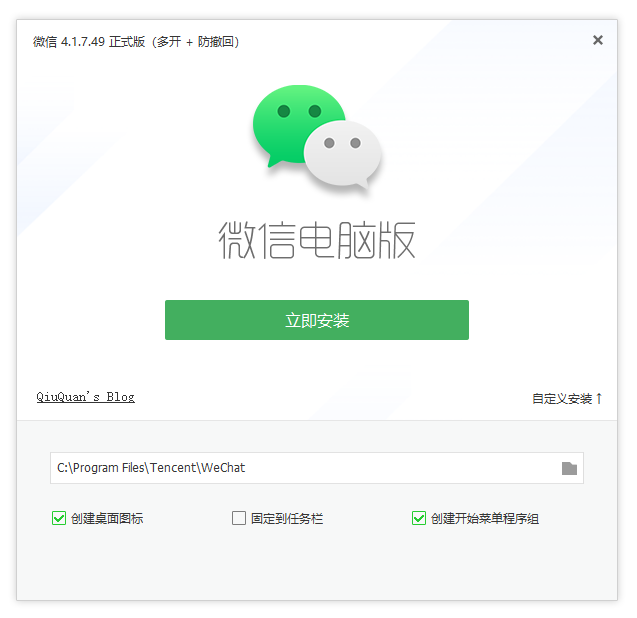
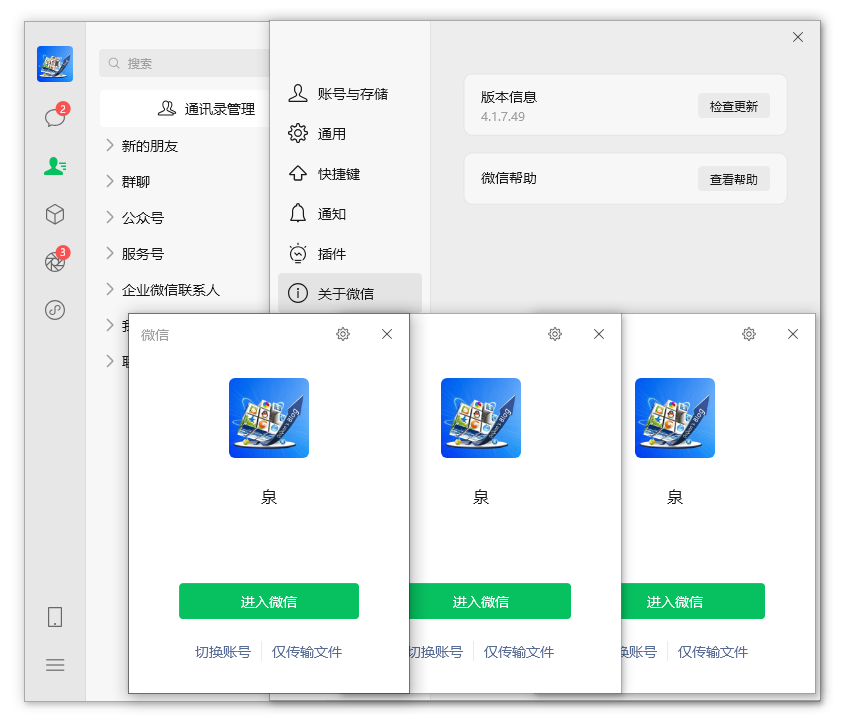
安装过程可定制多开、消息防撤回(不带撤回提示)功能;
安装程序采用 Inno Setup 打包,支持静默安装,参数为:/s 或 /S 或 /verysilent
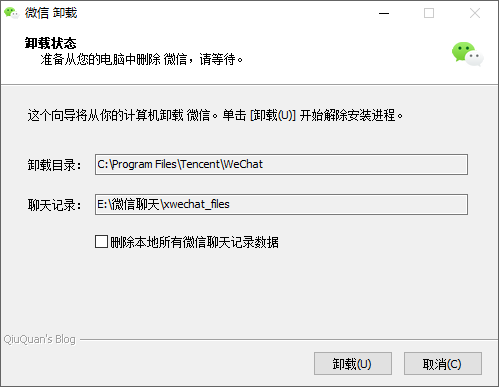
卸载过程自动检测微信聊天记录,并提供是否删除操作(默认不删除)。

游客下载:

多开版:https://drive.uc.cn/s/29e0e26c6bc54
防撤回版:https://pan.quark.cn/s/b2605d31cf83
多开+防撤回版:https://url84.ctfile.com/d/5279384-35861421-92b055?p=4221

登录下载:

程序截图:

01.png

02.png

赞(45) 打赏
未经允许不得转载:QiuQuan's Blog » 微信电脑版 3.9.8.15 正式版(32位)+ 3.9.12.57 正式版(64位)+ 4.1.7.49 正式版(64位)| 可选多开 + 防撤回

评论 158

  1. #70
    Google Chrome 142.0.0.0 Google Chrome 142.0.0.0 Windows 10 x64 Edition Windows 10 x64 Edition

    22号新版,用着用着会强退

    huizityh2周前 (01-23)回复印度
    • Safari 15.1 Safari 15.1 iPhone iOS 15.2 iPhone iOS 15.2

      用的是哪个版本?

      QiuQuan管理员2周前 (01-23)回复中国–广西–柳州 联通
      • Google Chrome 144.0.0.0 Google Chrome 144.0.0.0 Windows 10 x64 Edition Windows 10 x64 Edition

        我的也是自动退出了。版本4.1.7.25 电脑是win11

        AA2周前 (01-23)回复中国–北京–北京 联通
  2. #69
    Google Chrome 130.0.0.0 Google Chrome 130.0.0.0 Windows 10 x64 Edition Windows 10 x64 Edition

    使用后不会影响账号的稳定性把?

    qwqw2343周前 (01-20)回复中国–山东 联通/数据上网公共出口
    • Google Chrome 132.0.0.0 Google Chrome 132.0.0.0 Windows 10 x64 Edition Windows 10 x64 Edition

      我一直用自己修改的版本,但要说一定不会影响账号稳定性的话,我也不敢保证。

      QiuQuan管理员3周前 (01-20)回复中国–广西–柳州–柳北区 联通
  3. #68
    Google Chrome 143.0.0.0 Google Chrome 143.0.0.0 Windows 10 x64 Edition Windows 10 x64 Edition

    升级了,运行不了了

    金色时代1个月前 (12-30)回复中国–河北–保定 电信
    • Safari 15.1 Safari 15.1 iPhone iOS 15.2 iPhone iOS 15.2

      感谢反馈!已修复并重新上传。

      QiuQuan管理员1个月前 (12-30)回复中国–广西–柳州–柳北区 联通
  4. #67
    Google Chrome 127.0.0.0 Google Chrome 127.0.0.0 Windows 10 x64 Edition Windows 10 x64 Edition

    大佬,目前遇到的问题是,只要重启,双击就打不开了。然后安装最新原版一遍打开,接着再安装一遍双开版就能用,但是重启就失效。系统是win10最新版,请问有无解决办法啊?谢谢

    life2个月前 (12-09)回复中国–江苏–南京 电信
    • Google Chrome 132.0.0.0 Google Chrome 132.0.0.0 Windows 10 x64 Edition Windows 10 x64 Edition

      我用的也是win10,但不是最新版,目前无法重现你的问题。

      QiuQuan管理员2个月前 (12-09)回复中国–广西–柳州–柳北区 联通
      • Google Chrome 127.0.0.0 Google Chrome 127.0.0.0 Windows 10 x64 Edition Windows 10 x64 Edition

        好的,谢谢。我找了个另外替代的办法了。

        life2个月前 (12-10)回复中国–江苏–南京 电信
        • Google Chrome 142.0.0.0 Google Chrome 142.0.0.0 Windows 10 x64 Edition Windows 10 x64 Edition

          大佬有啥替代方法啊,我和你说的情况一样

          礼佛魔2个月前 (12-20)回复中国–陕西–汉中 电信
    • Google Chrome 142.0.0.0 Google Chrome 142.0.0.0 Windows 10 x64 Edition Windows 10 x64 Edition

      这个安装后只能用一次后双击没反应,我是这么解决的,就是C盘自己用户名下,把这个新版的微信AppData\Roaming\Tencent\xwechat,生成的的这个xwechat删了,然后又可以打开了,过后就一直可以用了

      huizityh2周前 (01-23)回复印度
  5. #66
    Google Chrome 122.0.6261.95 Google Chrome 122.0.6261.95 Windows 10 x64 Edition Windows 10 x64 Edition

    最新版还是那种问题,把之前版本的完全卸载之后再安装最新版,双击没有反应,不勾选多开也是一样,进程监视到两个微信进程和一个问题报告进程。你这里没办法发发图….

    jiojio3个月前 (11-08)回复中国–湖南–常德 电信
    • Safari 15.1 Safari 15.1 iPhone iOS 15.2 iPhone iOS 15.2

      我测试没问题,电脑上使用的也是17版,请自行排查原因。

      QiuQuan管理员3个月前 (11-08)回复中国–广西 广电网
    • LBrowser 9.0.6.2081 LBrowser 9.0.6.2081 Windows 10 x64 Edition Windows 10 x64 Edition

      需要安装官网最新版,再安装这个就可以正常了

      蓝色的大海3个月前 (11-23)回复中国–山东 移动/全省通用
  6. #65
    Google Chrome 122.0.6261.95 Google Chrome 122.0.6261.95 Windows 10 x64 Edition Windows 10 x64 Edition

    最新版,第一次安装后运行没问题,但是关机了重启,再双击就没反应了,用进程查看工具查看系统深处有两个死进程,无法终止,也无法激活。

    jiojio3个月前 (11-06)回复中国–湖南–常德 电信
    • Safari 15.1 Safari 15.1 iPhone iOS 15.2 iPhone iOS 15.2

      尝试卸载后重新安装,取消勾选“多开”和“防撤回”选框,即原版状态,看看重启后是否正常。

      QiuQuan管理员3个月前 (11-06)回复中国–广西–柳州–柳北区 联通
      • Google Chrome 122.0.6261.95 Google Chrome 122.0.6261.95 Windows 10 x64 Edition Windows 10 x64 Edition

        不行

        jiojio3个月前 (11-07)回复日本–东京都 Amazon数据中心
  7. #64
    Google Chrome 130.0.0.0 Google Chrome 130.0.0.0 Windows 10 x64 Edition Windows 10 x64 Edition

    为啥双击启动没有反应啊,重装也没用,之前用的好好的,突然就没有用了

    泪羽3个月前 (11-05)回复中国–江西–萍乡 电信
    • Safari 15.1 Safari 15.1 iPhone iOS 15.2 iPhone iOS 15.2

      遇到双击没反应的情况,尝试用最新版本。

      QiuQuan管理员3个月前 (11-05)回复中国–广西 广电网
  8. #63
    Google Chrome 142.0.0.0 Google Chrome 142.0.0.0 Windows 10 x64 Edition Windows 10 x64 Edition

    这更新速度有点跟不上了啊

    六神3个月前 (11-04)回复中国–内蒙古–乌兰察布 联通
    • Safari 15.1 Safari 15.1 iPhone iOS 15.2 iPhone iOS 15.2

      只要不是禁止登录或者强制更新的话,也没必要一直追新的。

      QiuQuan管理员3个月前 (11-04)回复中国–广西–柳州–柳北区 联通
  9. #62
    Google Chrome 139.0.0.0 Google Chrome 139.0.0.0 Windows 10 x64 Edition Windows 10 x64 Edition

    已经是4.1.4.12了

    xcjkk3个月前 (11-03)回复中国–浙江–杭州 电信
  10. #61
    Google Chrome 140.0.0.0 Google Chrome 140.0.0.0 Windows 10 x64 Edition Windows 10 x64 Edition

    4.1.4.11 更新

    早凉3个月前 (11-02)回复中国–安徽–合肥 电信
    • Google Chrome 132.0.0.0 Google Chrome 132.0.0.0 Windows 10 x64 Edition Windows 10 x64 Edition

      没找到 4.1.4.11 的包。

      QiuQuan管理员3个月前 (11-02)回复中国–广西–柳州–柳北区 联通

觉得文章有用就打赏一下文章作者

非常感谢你的打赏,我们将继续提供更多优质内容,让我们一起创建更加美好的网络世界!

支付宝扫一扫

微信扫一扫

登录

找回密码

注册